
In my previous post, I introduced a cloud-native architectural concept to track Sitecore asset usage within Content Hub in real time. The strategy is straightforward: rather than pulling data from Sitecore via heavy, on-demand crawls, we want the CMS to actively push usage signals to an external middleware layer the moment content goes live.
However, tracking exactly what went live without killing publishing performance requires more than just intercepting a single event. A standard Sitecore publish run can modify thousands of items across multiple languages and versions. If you only look at the end of the publish, you lose the granular context of individual item changes. If you inspect items too early, you end up over-processing data that might never make it to the web database.
In this second post of the series, we dive into the actual Sitecore CMS integration. We will explore how to cleanly hook into the granular stages of the Sitecore publishing lifecycle, extract asset IDs out of raw field data, and safely offload this data over HTTP without bottlenecking your content editors.
The Granular Strategy: Tapping Into the Lifecycle
To capture asset transitions reliably, our integration hooks into four distinct moments of the Sitecore publishing process. This is managed via an XML configuration patch targeting Sitecore’s event pipeline:
<configuration xmlns:patch="http://www.sitecore.net/xmlconfig/">
<sitecore>
    <events>
      <event name="publish:itemProcessing">
        <handler type="iO.Sitecore.publishing.Events.PublishEventHandler, iO.Sitecore.publishing" method="OnItemProcessing" />
      </event>
      <event name="publish:itemProcessed">
        <handler type="iO.Sitecore.publishing.Events.PublishEventHandler, iO.Sitecore.publishing" method="OnItemProcessed" />
      </event>
      <event name="publish:end">
        <handler type="iO.Sitecore.publishing.Events.PublishEventHandler, iO.Sitecore.publishing" method="OnPublishEnd" />
      </event>
      <event name="publish:end:remote">
        <handler type="iO.Sitecore.publishing.Events.PublishEventHandler, iO.Sitecore.publishing" method="OnPublishEndRemote" />
      </event>
    </events>
    <settings>
      <setting name="AssetUsage.AuditLogPath" value="$(dataFolder)/logs/published-items.json" />
      <setting name="AssetUsageService.ApiEndpoint" value="https://your-function-app.azurewebsites.net/api/SitecorePublishAPI" />
    </settings>
  </sitecore>
</configuration>
Why these exact events matter:
publish:itemProcessing&publish:itemProcessed: These events fire sequentially for every single item passing through the publishing queue. This allows us to inspect the precise state of the item moving from the source database (e.g.,master) to the target database (e.g.,web).publish:end: This fires globally on the local instance once the entire publishing operation has finished. It is the perfect moment to aggregate our collected data and ship it off.publish:end:remote: Crucial for multi-instance or scaled environments (like separated CM and CD setups) to ensure remote instances stay aware of completed operations via Sitecore’s EventQueue.
The Event Handler Implementation
The PublishEventHandler routes these raw event arguments to a dedicated PublishTelemetryService. To keep things efficient and thread-safe within the high-throughput publishing cycle, the telemetry service is instantiated via a classic double-check lock singleton pattern.
When a publish run concludes, OnPublishEnd wraps the transmission logic in a separate asynchronous task threadpool execution (Task.Run), ensuring the main Sitecore UI process gets released instantly.
Inside the Extraction Engine: Finding Content Hub Assets
Capturing the events is only half the battle; we also need to extract the actual Content Hub references from the fields of the items being processed. Content Hub data typically lands in Sitecore in two ways: via dedicated Image components (which use a raw XML block under the hood) or embedded directly inside Rich Text fields.
Our AssetExtractionService uses targeted Regular Expressions to parse these values efficiently without the overhead of loading heavy HTML document models mid-pipeline:
using System.Collections.Generic;
namespace iO.Sitecore.Publishing.Interfaces.Services
{
    public interface IAssetExtractionService
    {
        List<string> ExtractAssetIdsFromFieldData(IEnumerable<(string TypeKey, string Value, string InheritedValue, string Name)> fields);
        List<string> ExtractPublicLinksFromFieldData(IEnumerable<(string TypeKey, string Value, string InheritedValue, string Name)> fields);
        List<string> ExtractPublicLinksFromAnyFieldData(IEnumerable<(string TypeKey, string Value, string InheritedValue, string Name)> fields);
    }
}
(check out the repository for the actual implementation of the extraction service)
Guarding the Pipeline: Scalable, Non-Blocking Network Operations
If our telemetry layer tried to transmit data using an unoptimized network client, a sudden massive publish run could exhaust the server’s outbound TCP sockets, or worse, stall the CMS if the Azure Function middleware experienced latency spikes.
To secure system stability, our AssetUsageServiceClient employs a highly optimized configuration:
- Reused socket architecture: We encapsulate
HttpClientwithin a thread-safeLazy<T>wrapper initialized once for the application lifecycle. - High socket throughput: We bump
ServicePointManager.DefaultConnectionLimitto200to handle parallel connection requests cleanly. - Graceful degradation: Network timeouts, HTTP serialization errors, or service outages are cleanly logged internally using Sitecore’s diagnostic logger, preventing any external issue from breaking the core CMS experience.
private static HttpClient CreateHttpClient()
{
  // Elevate concurrent connection limits from the default legacy .NET constraints
  System.Net.ServicePointManager.DefaultConnectionLimit = 200;
  var client = new HttpClient();
  client.Timeout = TimeSpan.FromSeconds(30);
  return client;
}
Every gathered package resolves into a clean AssetUsageEvent containing contextual fields like ItemId, ItemPath, Language, Version, and the list of raw AssetIds. This payload is pushed to the Azure Function via an isolated POST request:
public async Task SendAsync(AssetUsageEvent payload, CancellationToken cancellationToken = default)
{
    if (payload == null || string.IsNullOrWhiteSpace(payload.ItemId)) return;

    HttpResponseMessage httpResponse = null;
    try
    {
        string jsonPayload = JsonSerializer.Serialize(payload, jsonOptions);

        using (var httpContent = new StringContent(jsonPayload, Encoding.UTF8, "application/json"))
        {
            httpResponse = await SharedHttpClient.PostAsync(endpointUrl, httpContent, cancellationToken).ConfigureAwait(false);

            if (!httpResponse.IsSuccessStatusCode)
            {
                await HandleHttpError(httpResponse, payload.ItemId).ConfigureAwait(false);
            }
        }
    }
    catch (HttpRequestException ex)
    {
        Log.Error($"[AssetUsageServiceClient] HTTP request failed for ItemId={payload.ItemId}. Error: {ex.Message}", ex, typeof(AssetUsageServiceClient));
    }
    finally
    {
        httpResponse?.Dispose();
    }
}
The Green-Field Problem: Establishing an Initial Baseline
Tapping into the live publishing pipeline guarantees that every new content modification captures asset footprints moving forward. But what about the years of historical content already sitting inside your production database? If you only rely on live runtime events, your middleware’s tracking store remains completely blind to existing dependencies until a content author manually touches and republishes an old page.
To solve this, we built an administrative Initial Asset Link Migration Tool right inside the Sitecore CMS admin folder. This script performs a full repository intake to populate our middleware with an accurate baseline footprint.
To keep the application’s memory consumption perfectly safeguarded during heavy runs, the migration loop runs sequentially through three distinct background phases:
- 1. Count: The process recursively crawls the selected Sitecore database from a designated root item node to establish a total item count.
- 2. Extract: It utilizes our compiled
AssetExtractionServiceto evaluate fields across every discovered item, separating the noise from nodes containing active Content Hub pointers or embedded media elements. - 3. Send: It filters out the empty elements and batches only the items containing confirmed asset dependencies, transmitting them sequentially to our Azure Function API endpoint.
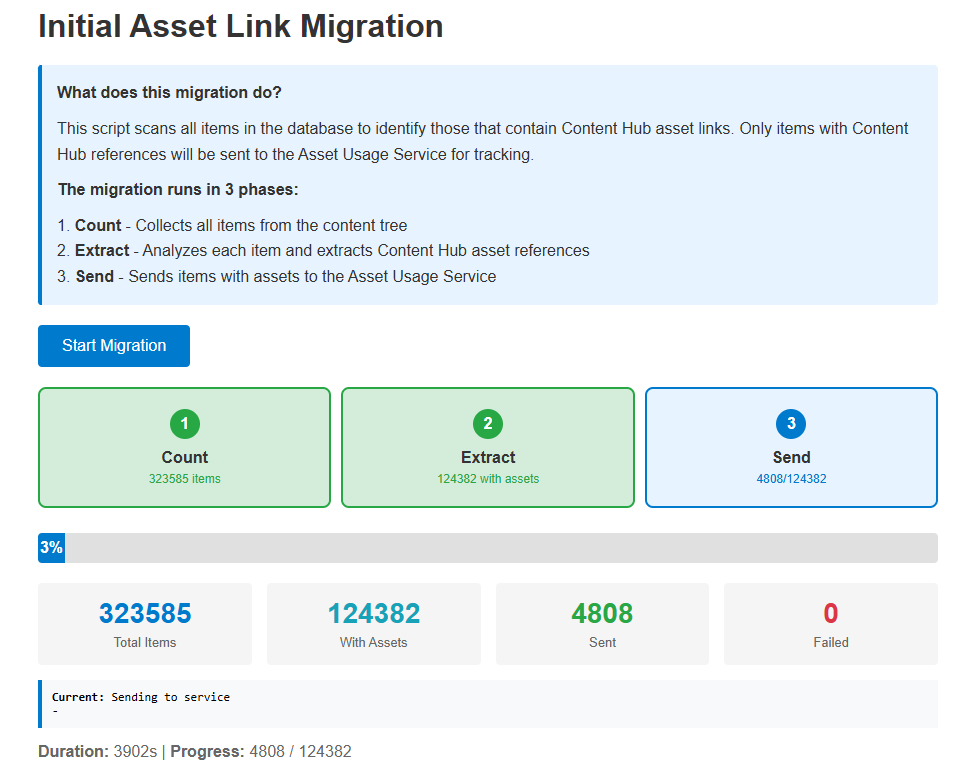
By rendering the processing states on a dedicated dashboard (MigrateAssets.html) that polls an internal handler (MigrationHandler.ashx), content infrastructure teams can trigger and monitor bulk ingestion progress transparently without timing out the browser execution thread or locking up the live CMS authoring environment.
Architectural Reflections: Embracing Eventual Consistency
By implementing this design, we choose an architecture anchored in eventual consistency. Sitecore’s primary job is simply to move content to the live web database as safely and fast as possible. Instead of tracking complex relational state changes directly within the CMS platform, Sitecore merely shoots out lightweight telemetry signals containing raw asset information.
The heavy lifting of keeping state, determining what was deleted versus what was added, and coordinating updates back into Content Hub belongs to the cloud middleware layer.
In the next post, we will step out of the legacy .NET Framework world and look at how our serverless architecture handles these incoming events: building an isolated, highly scalable Azure Function using modern .NET 8 and a MongoDB state engine to accurately calculate asset deltas. Stay tuned!
Leave a Reply